Watercolor Green Leaves PNG Clipart Set
A Versatile Design Asset for Natural, Organic Branding
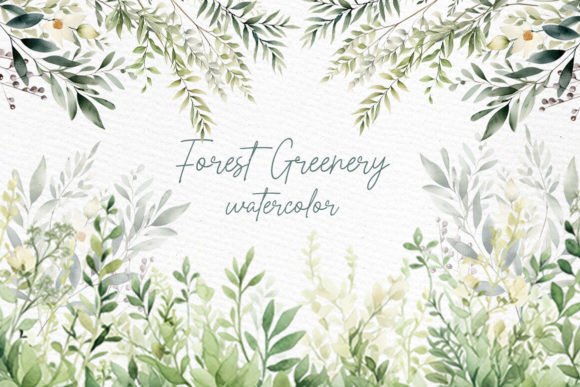
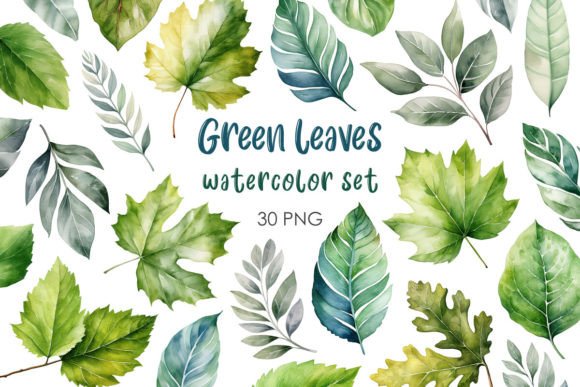
The Watercolor Green Leaves PNG Clipart Set brings a soft, botanical touch to digital and print projects. Each leaf is rendered in layered watercolor washes—some with delicate veins, others with gentle color bleeds. The greens range from muted sage to deeper forest, giving the set a natural, organic feel that works well across many visual styles. Unlike flat vector foliage, these leaves carry the texture and unpredictability of hand-painted art, which makes them particularly effective for brands and creators seeking warmth and authenticity.
Whether you are a designer building a mood board, a small business owner refreshing your packaging, or a blogger creating cohesive social media graphics, this clipart set offers flexibility without sacrificing visual quality. The PNG format with transparent backgrounds means you can drop these leaves directly into layouts, mockups, or composites without extra masking work.
Visual Characteristics and Personality
What sets this collection apart is its painterly quality. The leaves are not uniform—each one has subtle variations in opacity, edge softness, and color depth. This gives them the feel of original watercolor studies rather than mass-produced digital elements. The palette is restrained and earthy, which helps the set avoid feeling overly saturated or artificial.
The personality of the Watercolor Green Leaves PNG Clipart Set is calm, refined, and approachable. It leans into the biophilic design trend—bringing nature indoors—but in a polished way that suits both lifestyle brands and professional services. You would not use these for heavy industrial or tech branding, but for wellness, beauty, publishing, hospitality, and creative entrepreneurship, they are an excellent fit.
How It Compares to Other Botanical Assets
Standard vector leaf icons can feel stiff. Photographed leaves bring realism but also background clutter and lighting inconsistencies. This watercolor set sits in a sweet spot: it offers the artistry of handcrafted illustration with the convenience of ready-to-use digital files. When you are working on brand identity or editorial design, that middle ground saves time while elevating visual tone.
Where the Clipart Set Works Best Across Projects
The versatility of this set comes from its transparent PNG format combined with its natural style. Below are some of the most effective applications I have seen from designers and business owners using similar botanical clipart.
Branding and Logo Design
Watercolor leaves can serve as accent marks in logo lockups, as part of a brand pattern, or as standalone marks for secondary branding. For a wellness coach or organic skincare line, a single leaf placed beside the business name adds a handcrafted feel without overwhelming the typography. Pair the Watercolor Green Leaves PNG Clipart Set with a clean sans serif font for a modern organic look, or combine it with a refined serif font for a more editorial, heritage feel.
The key is restraint. Use one or two leaves rather than a dense cluster to maintain legibility and professional polish. The watercolor texture naturally draws the eye, so give it room to breathe.
Packaging Design
For small-batch products—candles, teas, soaps, or boutique food items—these leaves can wrap around labels, adorn boxes, or layer behind product names. The organic edges and soft gradients print beautifully, especially on uncoated or kraft paper stocks that enhance the watercolor effect. If you are designing packaging for a farmer's market line or a subscription box, this set can help establish a consistent botanical motif across multiple SKUs.
Web Design and Social Media Graphics
On digital platforms, the Watercolor Green Leaves PNG Clipart Set works well as background decoration, section dividers, or frame elements around text. For Instagram posts, layered leaves behind a quote can create depth without needing a full illustrated background. For blog headers or website hero sections, a subtle arrangement of leaves at the edge of the frame adds visual interest without distracting from the message.
Because the files are PNGs with transparent backgrounds, they load quickly and integrate easily into tools like Canva, Photoshop, Figma, or even keynotes for presentations. This makes them accessible to both experienced designers and hobbyists who do not want to deal with complex masking.
Editorial and Publishing Projects
Magazines, e-books, planners, and printable journals benefit from botanical accents that break up text blocks or emphasize chapter headings. These leaves can be used as bullet points, pull quote ornaments, or section markers. In a modern typography layout, adding a single watercolor leaf at the start of a chapter softens the page and invites reading.
How the Clipart Set Influences Visual Hierarchy and Brand Perception
Design assets do more than decorate—they shape how audiences perceive a brand. Watercolor textures, with their organic edges and translucent layers, convey handcrafted care, sustainability, and a human touch. When you consistently use the Watercolor Green Leaves PNG Clipart Set across your materials, you reinforce a brand identity that feels grounded and trustworthy.
From a visual hierarchy standpoint, these leaves are excellent as secondary or tertiary elements. They support, rather than compete with, headline display font choices or bold typography. If your brand uses a strong handwritten font for headings, pairing it with soft watercolor accents creates a coherent artisanal voice. If you lean toward a minimal sans serif approach, the leaves add the only decorative layer, making them a focal point.
Audiences often subconsciously associate watercolor imagery with authenticity and small-batch quality. For entrepreneurs and small business owners, this perception can be a differentiator in crowded markets where competitors rely on stock photography or generic icons.
Practical Guidance for Choosing and Using This Clipart Set
Before you download and start placing leaves everywhere, take a moment to evaluate how this specific set fits your project. Here is a practical checklist I share with clients and collaborators.
Evaluate Project Fit
Ask yourself: does the brand or project need an organic, natural feel? Watercolor green leaves suit wellness, lifestyle, education, hospitality, creative services, and eco-conscious brands. They are less appropriate for corporate finance, heavy machinery, law firms, or high-tech B2B industries—unless the goal is specifically to soften that image. If your brand voice is more urban, edgy, or industrial, look for geometric or monochrome botanical alternatives.
Test Pairings with Fonts
Clip art does not exist in isolation. The Watercolor Green Leaves PNG Clipart Set will interact with the typeface you choose. For the best cohesion:
- With a serif font: Creates a classic, editorial, or heritage feel. Great for book covers, magazines, and premium packaging.
- With a sans serif font: Feels clean and modern. Ideal for web design, minimalist branding, and social media.
- With a script font: Doubles down on handcrafted personality. Works well for wedding stationery, artisanal products, and personal blogs.
- With a handwritten font: Adds casual warmth. Perfect for planners, journals, and youth-focused brands.
Test these combinations in context. A leaf that looks perfect alone might overwhelm a delicate display font or get lost next to a heavy one. Scale, opacity, and placement matter as much as the asset itself.
Review What Is Included
The set typically includes multiple leaf designs, varying in size, shape, and color tone. Some may include stems, branches, or individual leaves. Look at the range: a diverse set gives you more flexibility to create compositions without repeating the same element. If you are designing a full brand identity or a multi-page document, variety is essential for maintaining visual interest.
Consider Readability and Layout
Watercolor textures have soft edges by nature, which means they do not always provide sharp contrast against dark backgrounds. If you are using these leaves on dark or richly colored surfaces, test how they read. You may need to apply a subtle drop shadow or place them on a light overlay. Similarly, if text sits directly on top of a leaf, ensure enough contrast for readability—especially for body copy set in a light sans serif font or a thin serif font.
Check the Licensing
Commercial licensing is critical when using any design asset in client work or products for sale. The Watercolor Green Leaves PNG Clipart Set should be reviewed for usage rights. Many clipart sets allow commercial use, but some restrict resale, redistribution, or use in certain contexts like logo trademarks. Always verify the license terms before incorporating the assets into branded materials you intend to sell or use for a paying client. This step protects both you and the original artist.
Real-World Examples and Design Observations
I have seen this type of botanical clipart used effectively in several contexts that might spark ideas for your own work.
One small skincare business used the leaves as a repeating watermark pattern on their website background—subtle enough to be atmospheric, but present enough to reinforce their natural ingredient story. They paired it with a clean sans serif font for product names and a handwritten font for taglines, creating a layered brand voice that felt both professional and personal.
A wedding invitation designer layered single leaves behind calligraphy text, varying the opacity so the typography remained the hero. The watercolor texture added depth to flat white paper without overwhelming the delicate script. The same leaves were then repurposed as envelope liners and menu accents, creating a cohesive suite from one clipart set.
For a blog focused on sustainable living, the leaves were used as bullet points in list posts and as decorative frames around photos. The consistent green palette tied the visual identity together across dozens of articles, and because the files were PNGs, no custom coding or design work was needed for each new post.
Making the Most of Your Clipart Investment
To get long-term value from the Watercolor Green Leaves PNG Clipart Set, treat it as a foundational layer rather than a one-time accent. Build a library of compositions using the leaves: create patterns, save layered arrangements, and experiment with different background colors. A muted sage green leaf on a cream background will feel entirely different from the same leaf on a deep charcoal or blush pink. By exploring these variations early, you have a toolkit of ready-to-use visuals for future projects.
If you work regularly with brand identity or content creation, consider how this set complements other design assets you own. Does it work alongside your existing textures, icons, or illustration styles? Can it be combined with floral or geometric elements? The more versatile the asset is within your personal library, the more it will contribute to consistent, professional work.
Watercolor green leaves may seem like a simple addition, but when used with intention, they can elevate a brand from generic to memorable. The texture, the natural palette, and the handcrafted quality speak to audiences who value authenticity—and that is a meaningful advantage in today's visual landscape.